
プロダクトSquat Alarm

Squat Alarm

App Store名:スクワットアラーム・タイマーApp Store name: スクワットアラーム・タイマー

鳴ったら、体を動かして止めます。When it rings, move to stop it.

アラームやタイマーにスクワットを組み合わせ、二度寝や先延ばしを減らすためのiPhoneアプリです。Squat Alarm pairs alarms and timers with a squat challenge to reduce oversleeping and procrastination.

App Storeで無料公開中Available on the App Store, free

アラーム一覧画面
スクワット完了画面
記録画面
主な機能Key features

スクワットで解除Stop with squats

設定した回数のスクワットを終えるまで、アラームやタイマーを止められない仕組みです。Alarms and timers are designed to stop after the required number of squats is completed.

端末上で検知On-device detection

手に持ったiPhoneの動きを端末内で処理し、スクワットの回数を判定します。Motion from the iPhone in your hand is processed on the device to detect squat counts.

積み重ねを記録Track progress

日別の回数と累計回数を端末内に保存します。Daily and total squat counts are stored on the device.

実際の画面で、Squat Alarmの操作の流れを紹介します。See the Squat Alarm flow in real screens.

アラームを設定し、スクワットで止めて、記録を振り返ります。Create an alarm, stop it with squats, and review your record.

Squat Alarmのアラーム一覧画面

Screen 01

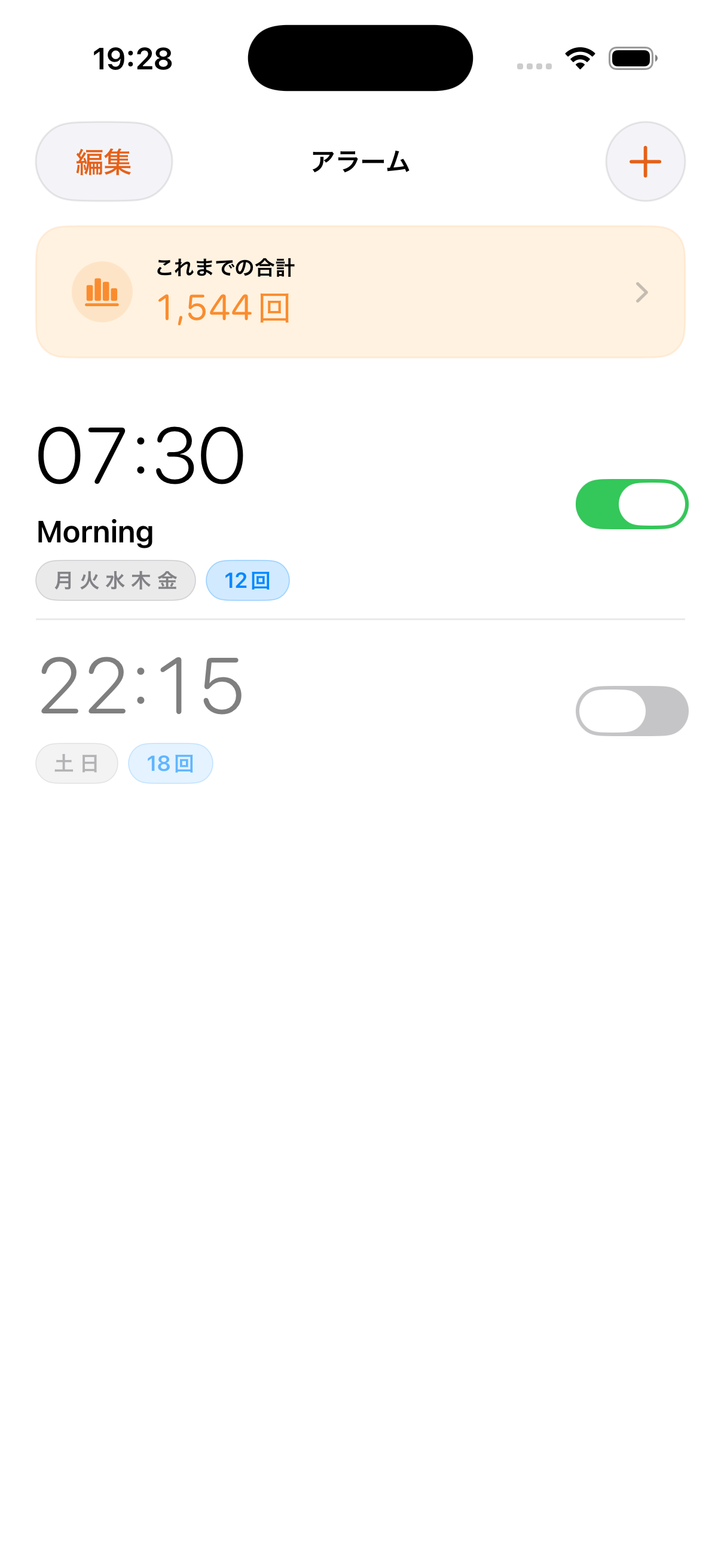
アラームごとに、スクワットの回数まで確認できます。Each alarm shows the squat count up front.

朝用、夜用、休憩明け用など、アラームごとにスクワットの回数を設定できます。Each alarm can carry its own squat count for mornings, evenings, or post-break resets.

  • 曜日やラベル、スクワットの回数を一覧で確認できます。Check weekdays, labels, and squat counts in the list
  • よく使うアラームは、スイッチで素早く切り替えられます。Toggle frequent alarms quickly
  • 累計回数のカードから、記録画面へ移動できます。Jump from the total-count card into records
Squat Alarmの解除完了画面

Screen 02

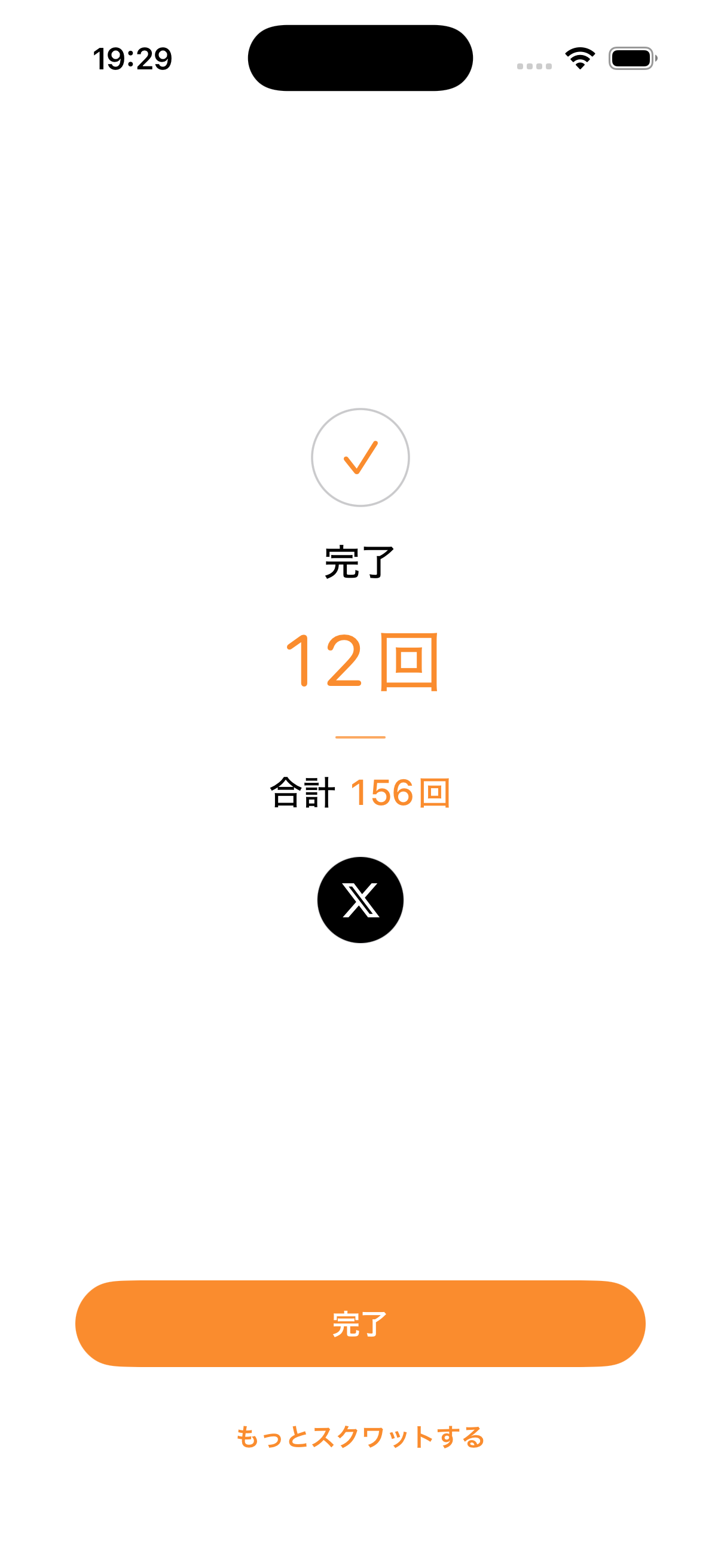
完了した回数が、その場で分かります。Completion is visible immediately.

スクワットを終えると、今回の回数と累計回数をその場で表示します。After finishing the squats, the screen shows the completed count and total count immediately.

  • 今回の完了回数を大きく表示します。Large display for the completed count
  • 累計回数も同時に確認できます。Total count appears on the same screen
  • 物足りないときは、追加でスクワットができます。Do more squats when you want an extra push
Squat Alarmの記録画面

Screen 03

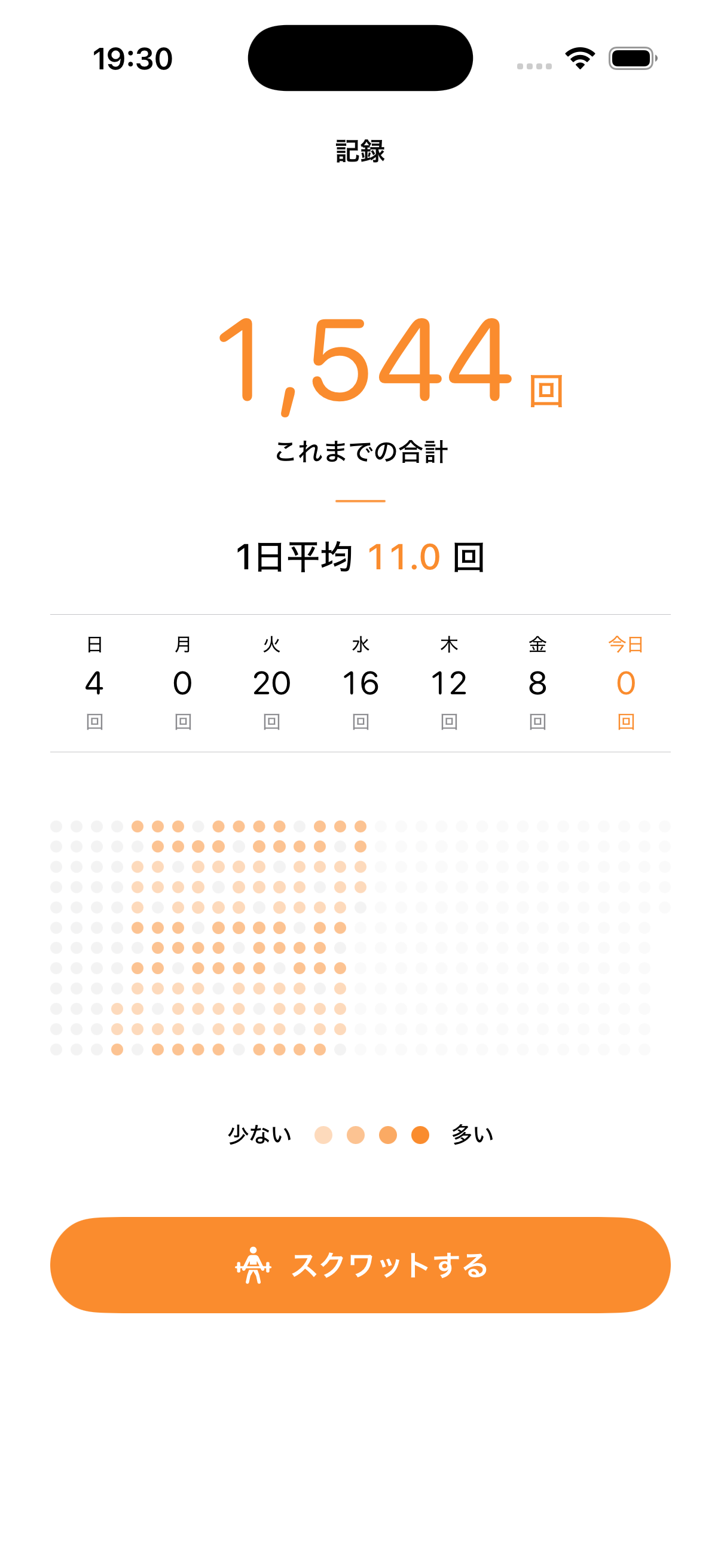
日々の積み重ねが、数字と色の濃淡で残ります。Progress stays visible through numbers and rhythm.

累計回数、1日あたりの平均、曜日ごとの回数、ヒートマップをまとめて表示します。Totals, daily average, weekday counts, and a heatmap are shown together.

  • 累計回数と1日の平均を大きく表示します。Large total and daily-average numbers
  • 曜日ごとの傾向を確認できます。Review weekday patterns
  • ヒートマップで、継続の状況を色の濃淡で確認できます。Use the heatmap to see consistency at a glance

使い方の流れHow it works

使い方How to use
  1. 1

    アラームごとにスクワットの回数を設定します。Set a squat count for each alarm.

    軽く起きたい朝は少なめに、しっかり切り替えたい休憩明けは多めにするなど、場面に合わせて回数を調整できます。Use a smaller count for gentle mornings or a larger count when you want a stronger reset after a break.

  2. 2

    iPhoneを手に持ってスクワットを行い、アラームを止めます。Hold your iPhone and squat to stop the alarm.

    端末の動きをもとにスクワットを判定します。The app uses device motion to detect squats.

  3. 3

    終えた回数が記録に残ります。Completed squats are recorded.

    朝起きるための動作が、そのまま運動記録として積み上がっていきます。The movement you do to wake up builds into an exercise record over time.

  4. 4

    スクワットの判定は端末内で行います。Squat detection stays on the device.

    広告や解析、トラッキング用のSDKは使いません。The app does not use advertising, analytics, or tracking SDKs.

お問い合わせとプライバシーポリシーは、別ページにまとめています。Contact and policy information live on separate pages.